Your day, on one screen
Home and the timesheet’s day now share one view, My day: your check-ins, your activities and what is wrong with the day, together.
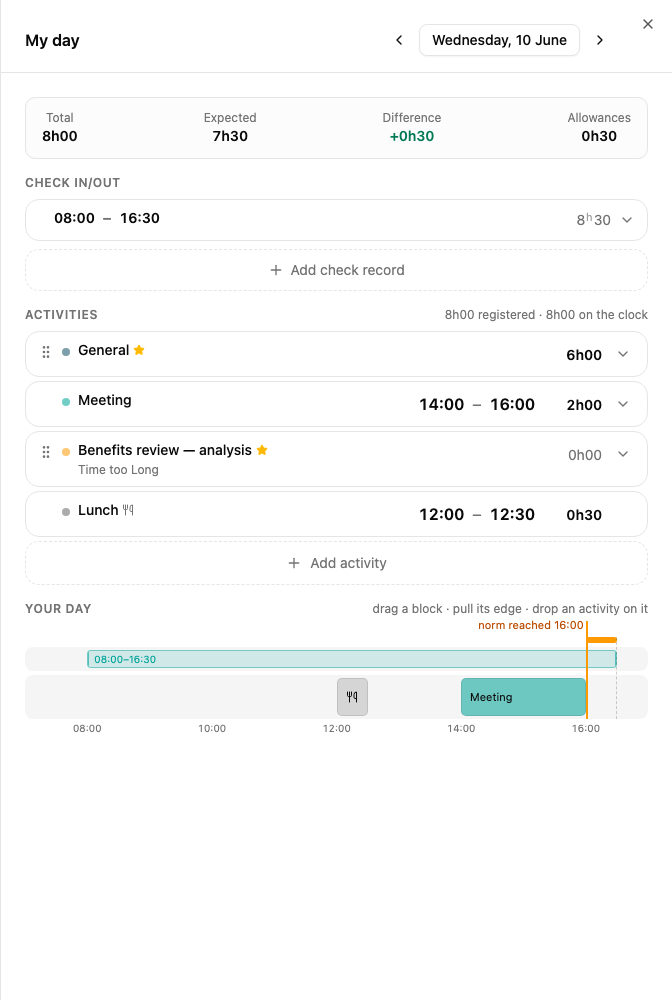
Edit where you see it
- Times and hours. Click a check-in time, an activity’s hours or its from–to and type over it. Tab moves to the next field.
- Activities as cards. Each activity is a card with its hours on the right. Open it for the note, the time of day, the favourite star and Delete.
- A from–to when it is needed. An activity that must have a from–to shows the two times on its card, ready to fill in.
- Keyboard. Up and Down move from card to card, Enter edits the card’s time and Escape steps back out.
What is wrong with the day
The day’s errors and warnings sit between your check-ins and your activities and stay in sight while you scroll. Overtime that no activity covers is marked in red on Your day, the timeline under the activities: click it and pick what it was.
Any day: My day
In the timesheet, click a day in the Check in/out row to open My day for that day. ‹ › steps through the days.
On a phone
The timesheet shows the same day. The week folds into one line as you scroll, and Check in, Check out and Add activity sit in their headings to leave the day the room.