See who will lose vacation days
Before the end of a vacation year, who still has days left, and who is going to lose some? The new Time off usage report answers it in one table.

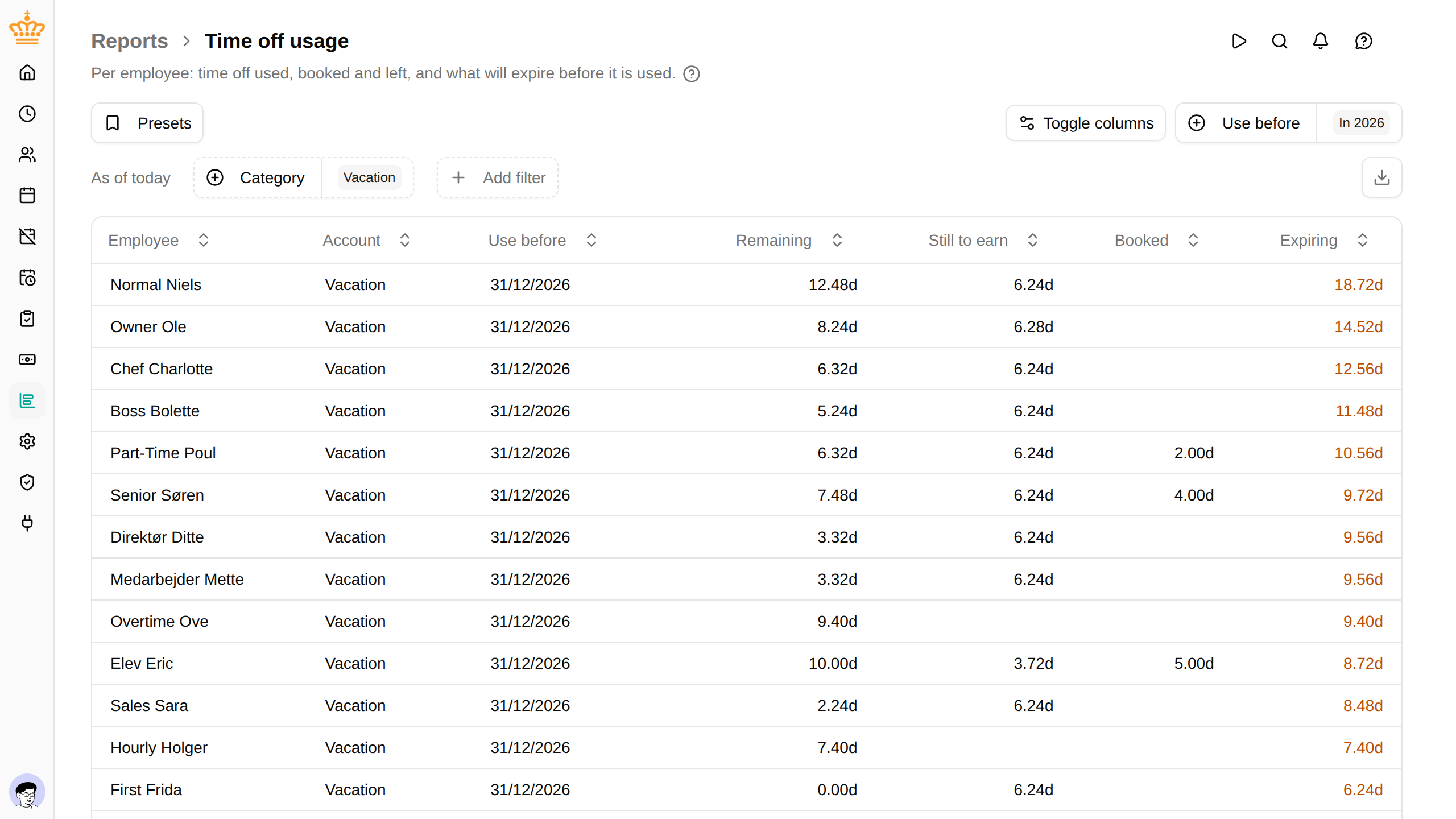
One row per expiry date
Each row is one employee’s days on one account that must be used before the same date. It shows:
- Remaining — what is held today
- Still to earn — what will still be earned into these days before they expire
- Booked — time off already booked from them, including requests awaiting your approval
- Expiring — what will be lost if nothing more is booked
The figures add up — Remaining + Still to earn − Booked = Expiring — and match what the employee sees on their own Time off page. Click a row to open the account’s details.
Pick what you look at
By default the report shows vacation days that must be used this year. Choose another year, the next 4 or 12 months, or another kind of time off, and save the view as a preset. Org unit, Used and Awaiting approval are a click away under Toggle columns, and the Excel export has them all.
Managers see their own employees, HR administrators everyone. Read more in Time off usage.