Allowances: count … when …
Allowance policies now read as one sentence: Count something when these conditions hold. It is the new default calculation type, Weekly Registrations.
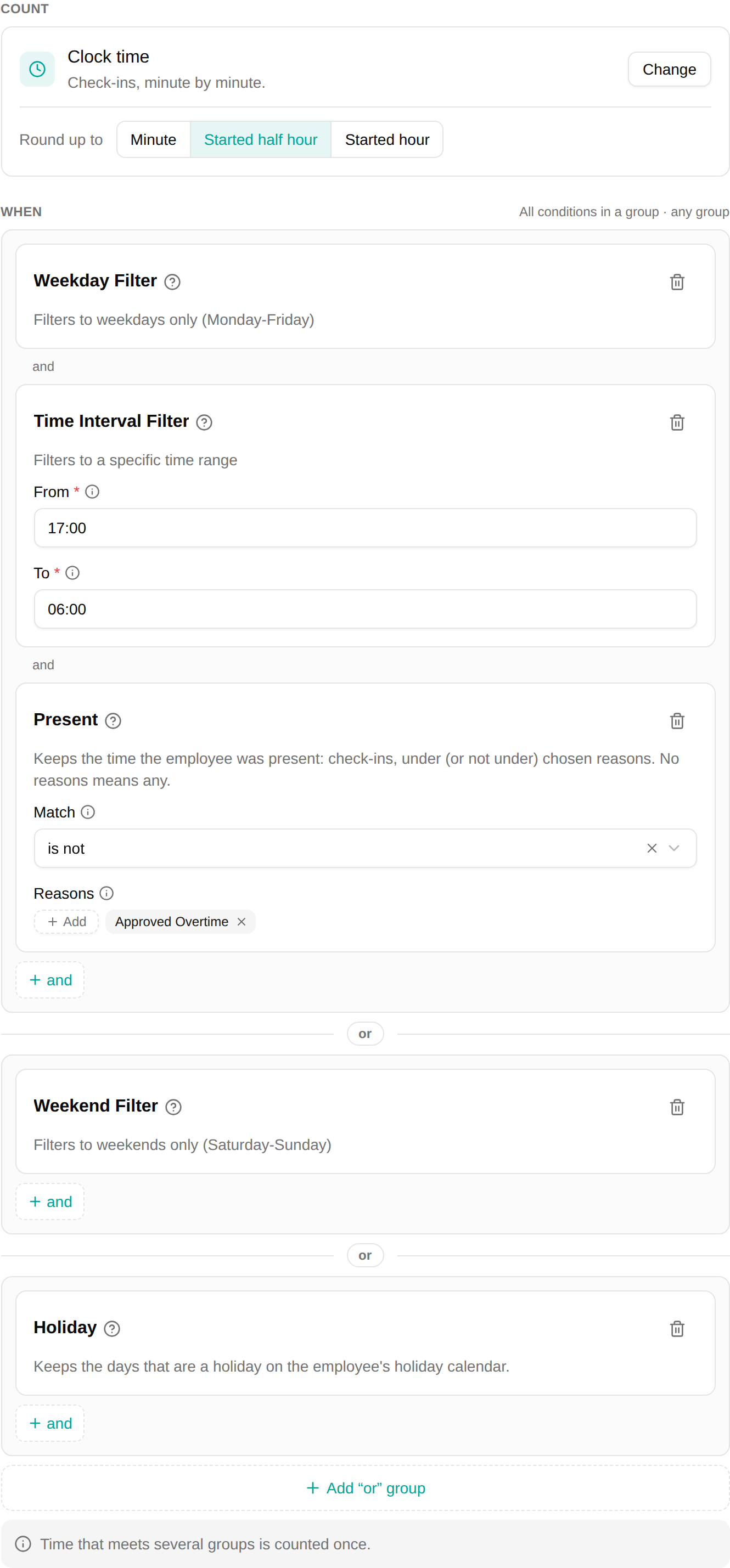
Count
Choose what the policy counts from a side panel with a search field:
- Clock time — the check-ins, rounded up to the minute, the started half hour or the started hour.
- Check-in sessions — a fixed amount for each check-in, for example a callout.
- A counter — per day, such as Worked hours, or for the whole week against the norm, such as Overtime.
When
Add conditions to say which time counts. All conditions in a group must hold (“and”), any group counts (“or”), and time that meets several groups is counted once. A policy without conditions counts every day, at any hour.
New conditions
- Present — is or is not chosen reasons. Present is not Ingen keeps time under Ingen out of a supplement.
- Holiday — the holidays on the employee’s own holiday calendar.
The Danish inconvenience-hours (17–06) and weekend-supplement conditions now also take their holidays from the employee’s holiday calendar, and Danish Holidays and Christian Holidays show their holidays in a table with each date.
Existing policies
The older Check in/out calculation type is still there and works as before. Existing Check in/out policies may appear in Weekly Registrations form: they count exactly what they counted before. Their original rules are kept, so you can open Check in/out to compare, and switch back by saving in that mode.