Lunch Deduction

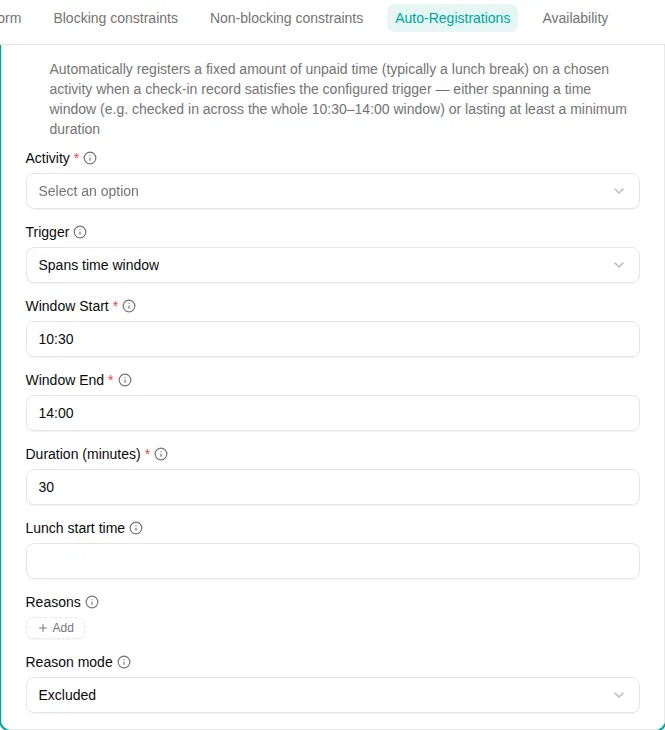
The Lunch Deduction plugin automatically registers a fixed amount of unpaid time (typically a lunch break) on a chosen activity when an employee’s check-in record satisfies a trigger. The deducted time reduces the worked total for that day.
When to use
Use this plugin when employees are not expected to check out for lunch, but an unpaid break should still be subtracted from their worked time — either at a fixed time of day or once they have been present long enough.
Parameters
| Parameter | Description | Required |
|---|---|---|
| Activity | The activity the deducted time is registered on (typically a “Lunch” activity). | Yes |
| Duration (minutes) | Amount of time to register when the trigger fires (e.g. 30). | Yes |
| Lunch start time | Optional time of day in HH:MM (e.g. 12:00) to place the break at. When set, the break occupies that exact interval and is subtracted from any allowance window it overlaps. Leave empty to keep the break duration-only. See Placing the break at a fixed time. | No |
| Trigger | How the deduction is triggered — Spans time window or Minimum record duration . See Trigger modes. | Yes |
| Window Start / Window End | The time window in HH:MM, interpreted in the workspace time zone. Used only with the Spans time window
trigger. | With interval trigger |
| Minimum record duration | The least a single check-in record must last to trigger the deduction. Used only with the Minimum record duration trigger. | With minutes trigger |
| Reasons | The presence reasons the reason gate applies to. Leave empty to apply to all reasons. See Reason gate. | No |
| Reason mode | Whether the selected reasons are Excluded or Required . Ignored when no reasons are selected. | No |
Trigger modes
Spans time window
Spans time window deducts the break when a single check-in record covers the whole configured window.
How it works:
- The employee must be checked in at or before Window Start and checked out at or after Window End .
- A record that only partially overlaps the window does not trigger the deduction.
Example: with a window of 10:30–14:00, an employee checked in 08:00–16:00 has a lunch deducted; one checked in 11:00–18:00 does not.
Minimum record duration
Minimum record duration deducts the break when a single check-in record lasts at least the configured number of minutes, regardless of when it falls.
How it works:
- The trigger is evaluated per record, not on the day’s total. An employee who genuinely checks out for a break produces two shorter records, so no lunch is deducted on top of the break they already took.
Example: with a minimum of 6h00, a single record of 08:00–16:00 (8 h) triggers the deduction; two records of 08:00–11:00 and 11:30–15:00 do not, because neither reaches 6 hours on its own.
Reason gate
The reason gate limits which check-in records can trigger the deduction, based on the reason recorded on each record. It applies to both trigger modes.
- Reason mode = Excluded : records with one of the selected reasons never trigger the deduction; all others do.
- Reason mode = Required : only records with one of the selected reasons trigger the deduction.
- Leaving Reasons empty turns the gate off — every record counts.
When an Excluded reason (for example a “No Lunch” reason) is recorded on the session, no break applies for that day at all: the automatic deduction is skipped, and a break the employee had set by hand on the activity is removed too.
Placing the break at a fixed time
By default the break is duration-only: it subtracts Duration (minutes) from the day’s worked total with no specific placement. Setting Lunch start time instead pins the break to an exact interval — from Lunch start time for Duration (minutes) , in the workspace time zone.
A placed break also reduces any allowance earned over a time window it overlaps, since the employee isn’t working during the break. For example, an evening supplement paid 18:00–22:00 with a 30-minute break placed at 19:00 pays 3.5 hours, not 4.
Employees can review and adjust the break from their timesheet check-in records — change its start or duration — and it is shown in the check-out dialog before they check out. A break placed outside the checked-in hours is not deducted, and the timesheet flags it so the start can be corrected.
Locking the automatic lunch
By default employees can adjust, remove or switch off the automatic lunch for themselves. To keep it exactly as registered, make the lunch activity unavailable to them: open the activity and narrow its Availability setting so it no longer reaches those employees — Nowhere for everyone, or Specific with an exception for the employees whose lunch you want to lock.
The plugin keeps registering the lunch on the activity. For the employees it no longer reaches:
- The lunch is read-only in their timesheet and check-in records, marked Registered automatically.
- They can’t change, remove or restore it, and they can’t register the activity by hand either.
- The lunch deduction no longer appears in My activities, and it applies even if they had switched it off before.
A manager editing the employee’s timesheet on their behalf can still correct the lunch. Lunches the employee removed before the lock stay removed; a manager can restore them day by day.
The lock doesn’t cover the reason gate: an employee who records an Excluded reason on a session still skips the lunch for that day. Choose the excluded reasons with that in mind.
How it works
- After the employee checks in and out, each check-in record is checked against the reason gate and the selected trigger.
- At most one deduction is registered per day, on the chosen activity, as unpaid time (it does not credit the norm).
- A manual entry on the same activity overrides the automatic one, and the employee can remove the deduction for a given day (and restore it later) — unless the lunch is locked.
Examples
Fixed midday break
For a workplace where everyone takes lunch around noon:
- Add the Lunch Deduction plugin
- Set Activity to your lunch activity
- Set Duration (minutes)
to
30 - Set Trigger to Spans time window
- Set Window Start
to
11:00and Window End to13:00
Break after a long shift
For employees on irregular shifts who should have a break deducted once they pass a certain length:
- Add the Lunch Deduction plugin
- Set Duration (minutes)
to
30 - Set Trigger to Minimum record duration
- Set Minimum record duration
to
6h00
Exclude certain presence types
To keep the deduction from firing on, say, course or travel time:
- Configure the trigger as above
- Set Reason mode to Excluded
- Add the course/travel reasons to Reasons
Troubleshooting
| Issue | Solution |
|---|---|
| No lunch is deducted | With the interval trigger, check the record fully covers the window in the workspace time zone; with the minutes trigger, check a single record reaches the minimum |
| A break was deducted on top of a real break | One check-in record still met the trigger on its own. With the interval trigger, the employee checked out for the break outside the window, so the record before or after it still spans the whole window; with the minutes trigger, one of the records still reaches the minimum on its own. Fit the window to when breaks are actually taken, or raise Minimum record duration |
| The deduction won’t come back after removal | Use the restore button on the cell in the timesheet |
| Employees can still change their lunch | Lock it by narrowing who can use the lunch activity |