Yearly Usage Limit

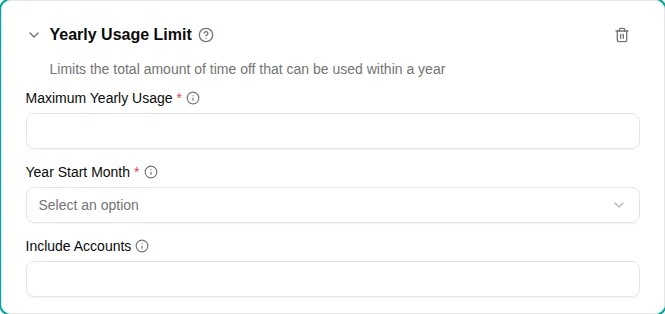
The Yearly usage limit plugin caps the total amount of time off that can be used within a defined year. This prevents employees from using more than their intended annual entitlement, even if they have accumulated more.
When to use
Use this plugin when:
- Company policy caps annual usage regardless of available balance
- You need to track usage against a year other than the calendar year
Parameters
| Parameter | Description | Default |
|---|---|---|
| Maximum yearly usage | Maximum days that can be used within the year. | Required |
| Year start month | Which month starts the usage year (e.g., “September” for Danish vacation year, “January” for calendar year). | Required |
| Include accounts | Additional accounts whose usage counts toward this limit (for combined caps). | — |
How it works
The plugin tracks total usage within the defined year. Pending requests always count, so employees can’t “reserve” more time than allowed:
- Determines which year the request falls into based on the start date
- Sums all used and planned time off in that year, including pending (not yet approved) requests
- Blocks the request if it would exceed the maximum
Year boundaries
The “year” is defined by the Year Start Month :
| Year start month | Year 2025/2026 runs from |
|---|---|
| January | January 1, 2025 – December 31, 2025 |
| September | September 1, 2025 – August 31, 2026 |
| April | April 1, 2025 – March 31, 2026 |
Examples
Limit carryover usage
Allow unlimited carryover of balance, but only 5 carryover days can be used per year:
- Add the Yearly Usage Limit plugin
- Set Maximum Yearly Usage
to
5 - Set Year Start Month to match your vacation year
This is useful when combined with an accrual of 25 days per year—employees can use 25 fresh days plus up to 5 carryover days annually.
Calendar year cap
Limit total usage to 30 days per calendar year:
- Add the Yearly Usage Limit plugin
- Set Maximum Yearly Usage
to
30 - Set Year Start Month to January
Combined account limit
If you have separate vacation and personal day accounts but want a combined usage cap:
- Add the Yearly Usage Limit plugin to your vacation policy
- Set Maximum Yearly Usage to your combined limit
- Add the personal days account to Include Accounts
Error messages
When a request would exceed the yearly limit, employees see a message indicating:
- The yearly limit
- How much they’ve already used
- How much remains available