Consecutive Days Limit

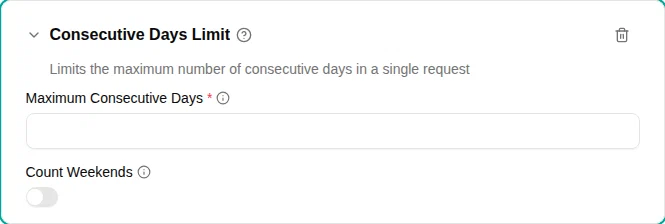
The Consecutive days limit plugin restricts how many days can be requested in a single time off request. This helps ensure adequate staffing and prevents excessively long periods of time off.
When to use
Use this plugin when:
- Company policy limits the maximum duration of a single vacation
- You need to ensure employees don’t take long periods of time off without special approval
- Different time off types have different maximum durations
Parameters
| Parameter | Description | Default |
|---|---|---|
| Maximum consecutive days | Maximum calendar days allowed in one request. | Required |
| Count Weekends | Whether weekend days count toward the limit. When turned off, only working days are counted. | Off |
How it works
The plugin counts the number of days in each request:
- Calculates the span from start date to end date
- Counts either all calendar days or only weekdays based on configuration
- Blocks requests that exceed the maximum
Calendar days vs. working days
With Count Weekends turned on:
- A Monday-to-Friday request (5 working days) counts as 5 days
- A Monday-to-Sunday request counts as 7 days
With Count Weekends turned off:
- A Monday-to-Sunday request counts as 5 working days
- Weekend days are excluded from the count
Examples
Maximum two-week vacation
Limit individual vacation requests to 14 calendar days:
- Add the Consecutive Days Limit plugin to your policy
- Set Maximum Consecutive Days
to
14 - Turn on Count Weekends
Maximum 10 working days
Limit requests to 10 working days (two work weeks), ignoring weekends:
- Add the Consecutive Days Limit plugin
- Set Maximum Consecutive Days
to
10 - Turn off Count Weekends
This allows employees to take a full two-week period (including weekends) since only the 10 working days are counted.
Short time off: 5 days max
For time off types meant for short periods of time off:
- Add the Consecutive Days Limit plugin
- Set Maximum Consecutive Days
to
5 - Turn on Count Weekends
Splitting long requests
If an employee needs more consecutive days than allowed, they can:
- Submit multiple separate requests
- Ask a manager to approve an exception (if your workflow supports it)
The plugin only validates individual requests—it doesn’t prevent back-to-back requests that together exceed the limit.
Error messages
When a request exceeds the consecutive days limit, employees see a message indicating:
- How many days were requested
- The maximum allowed