Blackout Periods

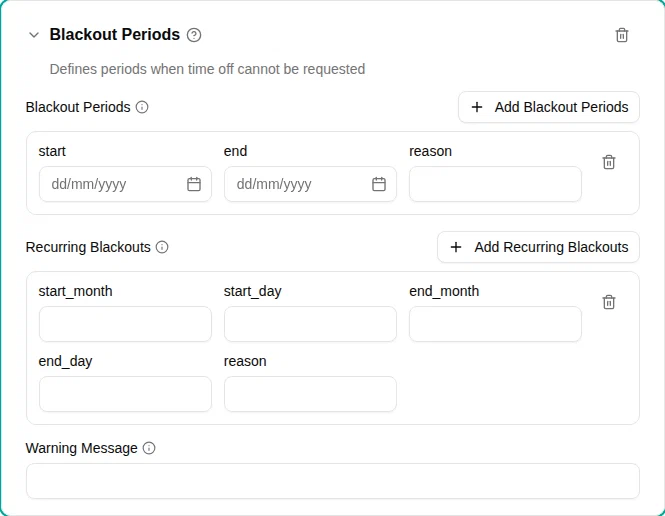
The Blackout periods plugin blocks time off requests during specified date ranges. Use it to restrict requests during busy seasons, critical business periods, or annual events.
When to use
Use this plugin when:
- Certain dates are closed for vacation (e.g., fiscal year-end, inventory)
- Annual events block time off (e.g., the Christmas retail season)
- Project deadlines or releases restrict availability
Parameters
| Parameter | Description | Default |
|---|---|---|
| Blackout periods | Specific date ranges when time off is blocked. | — |
| Recurring blackouts | Annually recurring blackout periods. | — |
| Warning message | Custom message shown when requesting during a blackout. | — |
Period fields
Each specific period includes:
| Field | Description |
|---|---|
| Start | First day of the blackout (inclusive) |
| End | Last day of the blackout (inclusive) |
| Reason | Why this period is blocked |
Recurring blackout fields
Each recurring blackout includes:
| Field | Description |
|---|---|
| Start month | Month when the blackout begins (1–12) |
| Start day | Day of month when the blackout begins |
| End month | Month when the blackout ends (1–12) |
| End day | Day of month when the blackout ends |
| Reason | Why this period is blocked |
How it works
When an employee submits a request:
- The system checks if any requested dates fall within a blackout period
- Specific date periods are checked first
- Recurring blackouts are expanded to the relevant years
- If there’s any overlap, the request is blocked
Year-wrapping recurring blackouts
Recurring blackouts can span year boundaries. For example, a December 20 to January 5 blackout:
- In 2025, blocks December 20, 2025 through January 5, 2026
- In 2026, blocks December 20, 2026 through January 5, 2027
Examples
Fiscal year-end freeze
Block all time off during your company’s fiscal year-end close:
- Add the Blackout Periods plugin
- Add a specific period:
- Start: Your fiscal year-end date (e.g., June 25, 2026)
- End: A few days later (e.g., July 5, 2026)
- Reason: “Fiscal year-end close”
Annual holiday season
Block vacation during the busy retail season every year:
- Add the Blackout Periods plugin
- Add a recurring blackout:
- Start month: 11 (November)
- Start day: 20
- End month: 12 (December)
- End day: 31
- Reason: “Holiday season”
Multiple blackout periods
You can combine specific and recurring periods:
- Add recurring blackouts for annual events
- Add specific periods for one-time events (major projects, company events)
Both types are checked for each request.
Year-end closure
Block time off around the New Year:
- Add a recurring blackout:
- Start month: 12 (December)
- Start day: 20
- End month: 1 (January)
- End day: 5
- Reason: “Year-end closure”
Error messages
When a request overlaps with a blackout period, employees see:
- The dates of the blackout
- The reason for the restriction (if provided)
- Any custom warning message you’ve configured