Balance Floor

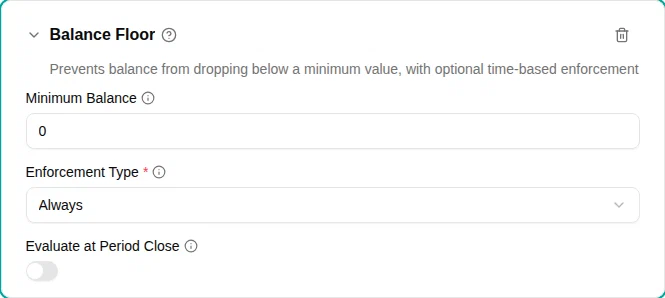
The Balance floor plugin prevents the account balance from going below a configured minimum. This is essential for enforcing “no negative balance” rules or allowing limited overdraft.
When to use
Use this plugin when:
- You want to prevent employees from using more time off than they’ve earned
- You need to allow limited overdraft (e.g., up to 5 days negative)
- Different floor rules apply at different times (e.g., stricter at year-end)
- You’re implementing Danish vacation law requirements
- Employees should be able to take flex or comp time in the same month they earn it
Parameters
| Parameter | Description | Default |
|---|---|---|
| Minimum balance | The floor value in days (in hours on an account measured in hours). Use 0 for no negative balance, or negative values (e.g., -5) to allow overdraft. | 0 |
| Enforcement type | When to enforce the floor: Always , Recurring (yearly) , or Specific Date Only . | Always |
| Enforcement date | Required for recurring and specific-date enforcement. The date when this floor applies. | — |
| Evaluate at period close | Judge the floor on the balance the period closes at, so time earned in the current period can be taken before the timesheet is approved. Only affects banks that are settled per period, such as flex and comp time. | Off |
Enforcement options
Always
Always enforces the floor at all times. The balance can never go below the minimum at any point.
Best for: Simple policies where the same floor always applies.
Recurring (yearly)
Recurring (yearly) enforces the floor on the same date each year. The balance must meet the floor on that specific date, but can go lower at other times.
How it works:
- Specify a month and day for enforcement
- The system checks that the balance meets the floor on that date each year
- Requests that would cause a violation on the enforcement date are blocked
Best for: Vacation year boundaries where balances must be cleared by a specific date.
Specific date only
Specific Date Only enforces the floor on a single, one-time date. After that date passes, the rule no longer applies.
Best for: Temporary requirements or transition periods.
Time earned in the current period
Some time banks — flex and compensatory time — are only topped up when the month’s timesheet is approved. Until then the overtime an employee has already worked is not in the balance, so a floor of 0 turns down a comp day in the very month it was earned.
Turn on Evaluate at Period Close to judge the floor on the balance the period closes at, instead of on each day on its own. Time the employee has already worked this period counts as available, so they can take it before the timesheet is approved.
Three things to know before turning it on:
- It works both ways. If the period is heading for a shortfall — the employee is behind their norm — the balance they can spend drops accordingly, and a request that today’s balance would cover can be turned down.
- The employee is told. When a request only fits because of time that has not been settled yet, the request screen says which amount is covering it and when it settles. Until the period is approved, the balance really is below the floor.
- Time about to be capped away can still be used. Where the period forfeits or pays out whatever sits above a ceiling, the employee can take that surplus as time off before the cut instead of losing it — the floor does not defend a balance that is about to disappear.
The time counted is the one earned in the period the requested day falls in, so an employee who still has an earlier timesheet to send is not judged on that older month’s figure.
It changes nothing for ordinary vacation balances: those are not settled per period, so there is no closing balance to judge them on. Between sending a timesheet and its approval there is nothing pending either, so for that short while the day-by-day floor applies again.
How it works
The plugin examines the complete balance forecast when validating a request:
- Calculates the projected balance timeline including the new request, every other approved and pending time off, future accruals, and any recurring balance cap (such as a quarterly flex cap that forfeits the surplus above a ceiling)
- Checks all points where enforcement applies
- Blocks the request if any enforcement point would be violated
For Always, this means checking every day in the forecast. For Recurring (yearly) or Specific date only, only the specified dates are checked.
Because the whole forecast is considered, a request can be blocked even when today’s balance looks sufficient — for example, when time off already approved later in the year, or an upcoming flex-cap cut-off, would push the balance below the floor.
Examples
No negative balance allowed
The simplest configuration prevents any negative balance:
- Add the Balance Floor plugin to your policy
- Set Minimum Balance
to
0 - Set Enforcement Type to Always
Allow 5 days overdraft
For companies that allow employees to “borrow” up to 5 days:
- Add the Balance Floor plugin
- Set Minimum Balance
to
-5 - Set Enforcement Type to Always
Danish vacation year-end rule
Danish vacation law requires that balances cannot be negative at the end of the vacation year (August 31), but allows overdraft during the year:
- Add the Balance Floor plugin
- Set Minimum Balance
to
0 - Set Enforcement Type to Recurring (yearly)
- Set Enforcement Date to August 31
You can combine this with another Balance floor plugin for year-round limits:
- Add a second Balance Floor plugin
- Set Minimum Balance
to
-5 - Set Enforcement Type to Always
This allows up to 5 days overdraft during the year, but requires a zero balance at year-end.
Comp time in the month it is earned
For a flex or comp-time bank an employee may draw on as soon as the hours are worked:
- Add the Balance Floor plugin
- Set Minimum Balance
to
0 - Set Enforcement Type to Always
- Turn on Evaluate at Period Close
The employee can now book time off against the hours they have already worked this month, as long as the month still closes at zero or above.
Error messages
When a request violates the balance floor, employees see a message indicating:
- Their current balance
- The date when the violation would occur
- How much additional balance they would need
As the employee picks dates, the request screen also previews the lowest balance the account is projected to reach and the date it happens — so a shortfall caused by later time off or a flex-cap cut-off is visible before submitting, not only after.