Allow past dates

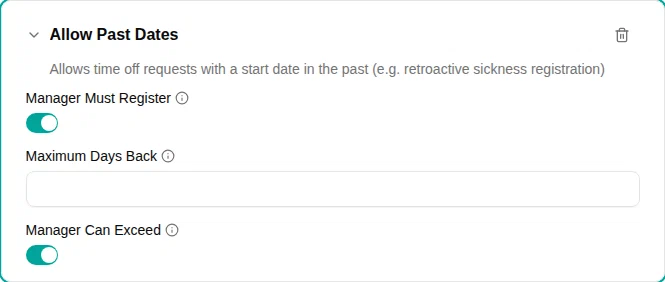
Let time off be registered with a start date in the past — typically retroactive sickness registration, where the time off is only reported after the employee is back.
Overview
By default, a time off request cannot start in the past. Adding the Allow Past Dates plugin to a policy lifts that rule for the accounts that policy funds, and lets you decide who may register retroactively and how far back they may go.
Parameters
| Parameter | Description | Default |
|---|---|---|
| Manager must register | When on, only a manager — the direct manager, anyone in the manager chain, or an admin — can register past-dated time off for the person. The employee cannot register one themselves. | On |
| Maximum days back | How many calendar days back a request may start. 0 means no limit. | 0 (unlimited) |
| Manager can exceed | When on, a manager registering on someone’s behalf may start earlier than Maximum Days Back . They see a warning and can continue. When off, the maximum applies to everyone, managers and admins included. | On |
How it works
When a request starts before today, the plugin decides in this order:
- Who is registering. With Manager Must Register on, an employee registering for themselves is blocked — “Only a manager can register time off in the past for this person”. Registering your own time off is always treated as the employee’s own request, whatever your role, so a manager filing their own past-dated sickness is blocked too.
- How far back it starts. If the start date is outside Maximum Days Back , the request is blocked — “Requests can only go back 30 days (this is 34 days ago)”.
- Whether the manager may exceed it. With Manager Can Exceed on, that block becomes a warning for a manager or admin — “Registering 34 days back, outside the 30-day policy window” — and they can submit.
A manager registering inside the window sees an informational note that they are registering in the past, overriding the standard policy.
Combining the two switches
The switches answer different questions, and it is worth being deliberate about the combination:
| Manager Must Register | Manager Can Exceed | Effect |
|---|---|---|
| On | On | Only managers register retroactively; the maximum guides them but does not stop them. |
| On | Off | Only managers register retroactively, and the maximum is a hard stop for them too. |
| Off | On | Employees register retroactively up to the maximum; managers may go further. |
| Off | Off | Everyone may register retroactively, nobody may pass the maximum. |
With Manager Must Register on, an employee cannot register a past date at all — so Maximum Days Back only ever applies to the manager. Turning Manager Can Exceed off in that combination makes the window absolute for the only people the policy allows to register at all.
Configuration
- Go to and open a time off policy
- In the Usage section, add the Allow Past Dates plugin
- Choose whether Manager Must Register is on
- Set Maximum Days Back
, or leave it at
0for no limit - Choose whether Manager Can Exceed is on
- Click Save
Examples
Retroactive sickness, manager-registered
Sickness is reported to the manager, who registers it once the employee is back:
- Add the Allow Past Dates plugin
- Leave Manager Must Register on
- Set Maximum Days Back
to
30as guidance - Leave Manager Can Exceed on, so a late report is still possible
A hard cut-off for payroll
Nothing may be registered into a period that payroll has already settled:
- Add the Allow Past Dates plugin
- Set Maximum Days Back to the number of days you allow
- Turn Manager Can Exceed off
Self-service correction within a week
Employees fix up their own last few days, managers reach further back:
- Add the Allow Past Dates plugin
- Turn Manager Must Register off
- Set Maximum Days Back
to
7 - Leave Manager Can Exceed on
Related restrictions
A past date can still be refused for reasons outside this plugin — most often because the period is closed: a timesheet statement covering those days has been submitted or approved. Time registrations and check-in/out have their own separate back-dating limits, set with the Limit backdating plugin on a work time policy — note that those count working days rather than calendar days.