Swedish Compensatory Day Off

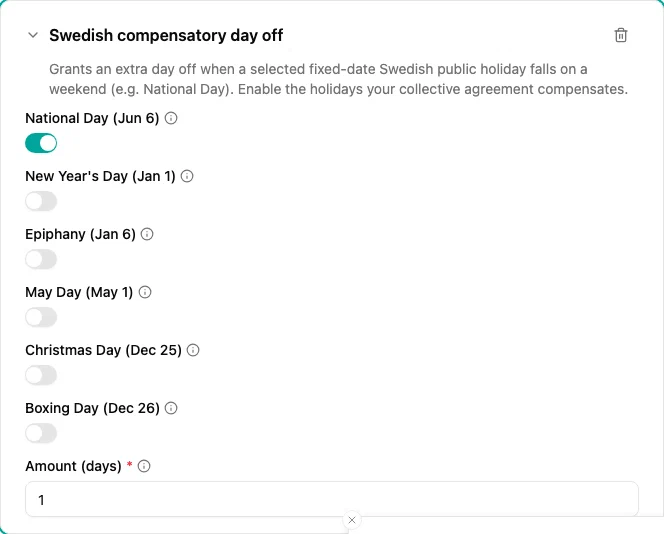
The Swedish compensatory day off plugin grants an extra day off when a selected Swedish public holiday with a fixed date falls on a weekend. Some Swedish collective agreements compensate a holiday that would normally be a day off but happens to land on a Saturday or Sunday — most commonly Sveriges nationaldag (National Day, 6 June) — so the employee does not silently lose it.
When to use
Use this plugin when:
- Your collective agreement grants compensatory time off for public holidays that fall on a weekend
- You want the compensation to be awarded automatically, only in the years a holiday actually falls on a Saturday or Sunday
Add the plugin to a time off policy alongside the holiday calendar and the account your agreement uses. Turn on exactly the holidays your agreement compensates.
Parameters
| Parameter | Description | Default |
|---|---|---|
| National Day (Jun 6) | Compensate Sveriges nationaldag when it falls on a weekend. | On |
| New Year’s Day (Jan 1) | Compensate Nyårsdagen when it falls on a weekend. | Off |
| Epiphany (Jan 6) | Compensate Trettondedag jul when it falls on a weekend. | Off |
| May Day (May 1) | Compensate Första maj when it falls on a weekend. | Off |
| Christmas Day (Dec 25) | Compensate Juldagen when it falls on a weekend. | Off |
| Boxing Day (Dec 26) | Compensate Annandag jul when it falls on a weekend. | Off |
| Amount (days) | Days granted for each qualifying holiday. | 1 |
The amount is expressed in days and credited in the account’s own unit. A days account receives the flat amount (a day is a day, regardless of working time). An hours account receives the employee’s own working day — the full-time daily norm scaled by the employee’s part-time percentage — so a part-time employee is credited their day, not a full-time one.
How it works
For each holiday that is turned on, in every year of the forecast:
- The plugin checks the holiday’s fixed date for that year (for example 6 June)
- If that date falls on a Saturday or Sunday, and the employee is employed on that date, it grants one accrual of the configured amount
- The accrual is booked on the holiday’s own date
If the holiday falls on a weekday that year, nothing is granted — there is no day off to compensate.
Only the six holidays above are offered, because they are the only Swedish public holidays with a fixed date whose weekday changes from year to year. Holidays that are always on a weekday (Good Friday, Easter Monday, Ascension Day) never need compensation, and holidays that are always on a weekend (Easter Sunday, Whit Sunday, All Saints’ Day, Midsummer Day) are already non-working days.
Examples
National Day only (the default)
- Add a new time off policy and choose the account the compensation should credit
- Select the Swedish compensatory day off accrual plugin
- Keep National Day (Jun 6) on and leave the other holidays off
- Keep Amount (days)
at
1
In a year where 6 June is a Saturday or Sunday, each covered employee is granted one day; in years where it falls on a weekday, nothing is granted.
Compensating several holidays
- Add the Swedish compensatory day off plugin
- Turn on every holiday your agreement compensates (for example National Day and Boxing Day)
- Set Amount (days) to the number of days granted per occurrence
Troubleshooting
| Issue | Solution |
|---|---|
| No compensation appeared this year | The holiday fell on a weekday that year, so there was nothing to compensate. Check next year, or confirm the holiday’s toggle is on. |
| Compensation is not credited to an employee | Confirm the policy applies to the employee (availability scope) and that the plugin is on the policy whose account should receive the day. A separate compensation policy must target its own account — per account, only the most specific matching policy applies. |
| Wrong number of days granted | Adjust Amount (days) . On an hours account the amount in days is converted to the employee’s own working time (the full-time daily norm scaled by their part-time percentage), so part-time employees receive fewer hours than full-time ones. |