Periodic Accrual

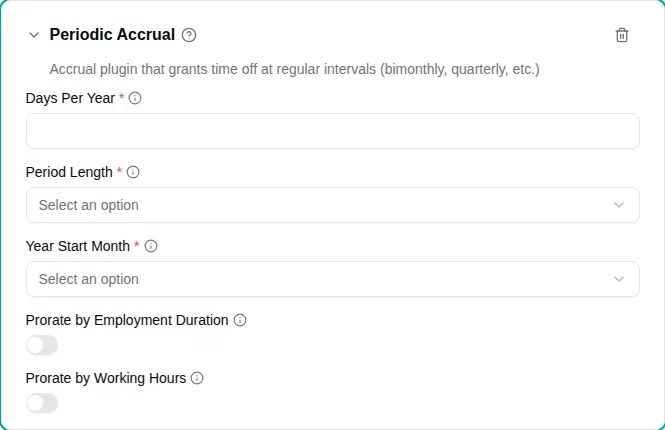
The Periodic accrual plugin grants time off at regular intervals throughout the year. Choose from bimonthly, quarterly, every 4 months, or semiannual periods.
When to use
Use this plugin when:
- Benefits are granted at fixed intervals rather than monthly
- Your policy requires quarterly or semiannual accruals
- You need predictable accrual dates aligned with business cycles
- Benefits don’t depend on employee age (for age-based benefits, use Age-based accrual)
Parameters
| Parameter | Description | Required |
|---|---|---|
| Days per year | Total days accrued annually. The amount is distributed evenly across the periods. | Yes |
| Period length | How often accruals occur. Options: Every 2 months, Quarterly, Every 4 months, Semiannual. | Yes |
| Year start month | Which month starts the accrual year. Periods are aligned to this month. | Yes |
| Prorate by employment duration | When turned on, employees who start or end employment mid-period receive proportionally fewer days. | No |
| Prorate by working hours | When turned on, part-time employees receive proportionally fewer days based on their FTE. | No |
Period lengths
Every 2 months (bimonthly)
6 accruals per year. With a January year start, accruals occur on:
- January 1, March 1, May 1, July 1, September 1, November 1
Quarterly (every 3 months)
4 accruals per year. With a January year start, accruals occur on:
- January 1, April 1, July 1, October 1
Every 4 months
3 accruals per year. With a January year start, accruals occur on:
- January 1, May 1, September 1
Semiannual (every 6 months)
2 accruals per year. With a January year start, accruals occur on:
- January 1, July 1
How it works
The plugin calculates accruals at regular intervals:
- Period alignment: Periods are aligned to the Year Start Month
- Amount calculation: The annual amount is distributed across periods using accurate rounding
- Employment check: Only employees who are employed on the period start date receive the accrual
- Proration: FTE and employment duration proration are applied if configured
- Crediting: Amount is added to the time account
Rounding
The plugin uses “difference on last” rounding to ensure yearly totals are exact. For example, with 5 days per year and bimonthly accruals:
- Periods 1-5: 0.82 days each
- Period 6: 0.90 days
- Total: exactly 5 days
Examples
Quarterly wellness days
For 4 wellness days granted quarterly:
- Add the Periodic Accrual plugin
- Set Days Per Year
to
4 - Set Period Length to Quarterly (Every 3 Months)
- Set Year Start Month to January
Result: 1 day on January 1, April 1, July 1, and October 1.
Semiannual bonus days
For 2 bonus days granted twice per year:
- Add the Periodic Accrual plugin
- Set Days Per Year
to
2 - Set Period Length to Semiannual (Every 6 Months)
- Set Year Start Month to January
Result: 1 day on January 1 and 1 day on July 1.
Bimonthly personal days with FTE proration
For 6 personal days for full-time employees, prorated for part-time:
- Add the Periodic Accrual plugin
- Set Days Per Year
to
6 - Set Period Length to Every 2 Months
- Set Year Start Month to January
- Turn on Prorate by working hours
Result for 0.5 FTE employee: 0.5 days every 2 months = 3 days total.
Fiscal year quarterly accrual
For a company with an April-March fiscal year:
- Add the Periodic Accrual plugin
- Set Days Per Year
to
8 - Set Period Length to Quarterly (Every 3 Months)
- Set Year Start Month to April
Result: 2 days on April 1, July 1, October 1, and January 1.
Comparison with other plugins
| Feature | Periodic accrual | Monthly accrual | Yearly accrual |
|---|---|---|---|
| Frequency | 2, 3, 4, or 6 months | Monthly | Once per year |
| Flexibility | Multiple period options | Fixed monthly | Start or end of year |
| Best for | Quarterly/semiannual benefits | Danish vacation | Simple annual grants |
Troubleshooting
| Issue | Solution |
|---|---|
| Employee didn’t receive accrual | Check their employment start date — they must be employed on the period start date |
| Wrong accrual date | Verify Year Start Month — periods are aligned to this month |
| Partial amount received | Check if Prorate by working hours or Prorate by Employment Duration is turned on |
| Need monthly accruals | Use the Monthly accrual plugin instead |