Danish Care Days (Omsorgsdage)

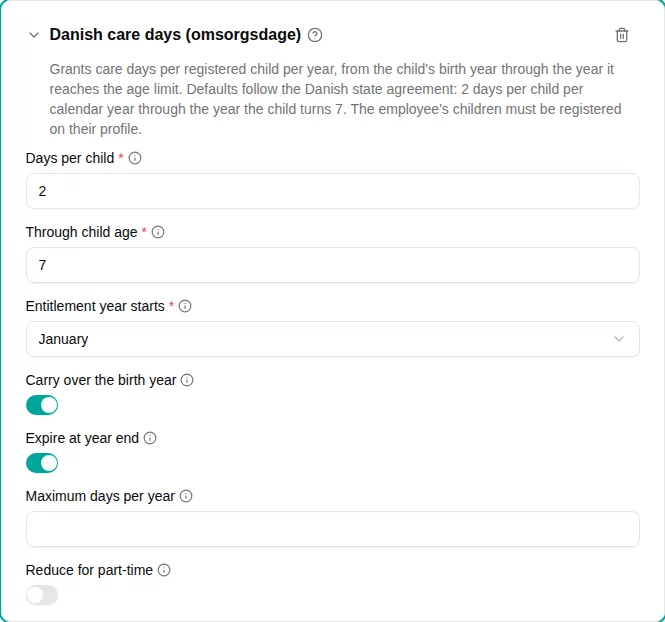
The Danish care days plugin grants omsorgsdage automatically, per child, per year. Danish public-sector agreements give every employee two care days per child each calendar year, from the year the child is born through the year the child turns 7 — up to 16 days over a child’s life.
Instead of tracking that by hand, you register each employee’s children once, and the days appear on their time account every year for as long as the children qualify.
Before you start
Two things have to be in place, in this order:
- Add this plugin to a time off policy. The Children section only appears on the employee page once some policy in the workspace uses care-day accrual. A child’s details are personal data about someone who does not work for you, so mTime does not ask for them until something actually needs them.
- Register each employee’s children. Open the employee under , go to the Children section and choose Add Child . The birth date is required — everything is calculated from it. The name is optional and is only there so you can tell two children apart.
The plugin grants nothing for an employee who has no children registered.
When to use
Use this plugin when your agreement grants care days per child. The defaults match the Danish state agreement (statens barselsaftale §14), and the municipal and regional agreements (KL and RLTN) follow the same rules — two days per child per calendar year through the year the child turns 7 — so the same settings cover all three areas.
Adjust the parameters only if you are on a local or private agreement that differs.
Parameters
| Parameter | Description | Default |
|---|---|---|
| Days per child | Care days granted for each child, per year. | 2 |
| Through child age | The last age that earns days. A child earns them through the year it reaches this age. | 7 |
| Entitlement year starts | The month the entitlement year opens. The Danish agreements use the calendar year. | January |
| Carry over the birth year | Days earned in a child’s birth year stay available through the following year. Days from any other year lapse at year end. | On |
| Expire at year end | Unused days lapse when their year ends. Turn off to let the policy’s expiration rule decide instead. | On |
| Maximum days per year | Caps the total across all children per year. Leave empty for no cap. Not part of the Danish state agreement. | No cap |
| Reduce for part-time | Give part-time employees their own shorter working day instead of a full-time one. Only affects accounts measured in hours. | Off |
How it works
For each registered child, in every year of the forecast:
- The plugin checks whether the child still qualifies — it earns days from the year it was born through the year it reaches the age limit
- It checks that the employee was employed during that year
- It grants Days per child for that child, booked at the start of the year
A few rules are worth knowing, because they are what the agreement says rather than what you might expect:
- The whole year’s days are granted however late in the year the employee starts. There is no reduction for a mid-year start, and children born before the employee joined count too.
- Days are granted once per year, even if the employee has more than one employment record in it. Someone who leaves and is re-hired in the same year does not get a second set.
- Days from a child’s birth year last a year longer. They stay available through the end of the following year. Days from any other year lapse at the end of their own year and are never paid out.
- A birth registered late still earns the days already owed. The days are granted as soon as you register the child, rather than waiting for next year — and if the birth was late enough in the previous year that its days are still usable, that year is granted too. This only reaches back while the days remain usable: a year that already lapsed is never revived.
- Days are only recovered for time the employee actually worked for you. If they were hired after the year in question ended, nothing is granted for it — those days belong to the previous employer, and mTime cannot know them (see below).
The days are credited in the account’s own unit. A days account receives the flat number of days — a day is a day, regardless of working time. An hours account receives the equivalent in hours; turn on Reduce for part-time to credit a part-time employee their own shorter day instead of a full-time one.
Examples
The Danish state agreement (the default)
- Add a time off policy and choose the account the care days should credit
- Select the Danish care days (omsorgsdage) accrual plugin
- Leave every parameter at its default
An employee with a child born in March 2019 receives two days each year from 2019 through 2026 — the year the child turns 7 — and nothing from 2027.
An agreement that caps the total
- Add the Danish care days (omsorgsdage) plugin
- Set Maximum days per year to the agreed maximum
With three qualifying children and a maximum of 5, the employee receives 5 days for the year rather than 6. The cap is filled starting with the oldest child.
An agreement where days accumulate
- Add the Danish care days (omsorgsdage) plugin
- Turn off Expire at year end
The plugin then sets no expiry of its own, and the policy’s expiration rule decides how long the days last.
Troubleshooting
| Issue | Solution |
|---|---|
| The Children section is missing on the employee page | Add this plugin to a time off policy first — the section only appears once a policy in the workspace uses care-day accrual. |
| No care days appeared for an employee | Check that the children are registered on the employee (Children section). The plugin grants nothing for an employee with no children. |
| A child is registered but earns nothing | Check the birth date. A child stops earning after the year it reaches Through child age . |
| The days appeared in the middle of the year, not on 1 January | Expected when you register a child part-way through the year: the year’s days are granted when the child becomes known, so they are not lost. |
| Registering a birth in January did not produce last year’s days | Check that the employee was already employed when those days arose. If they joined after that year ended, the days belong to their previous employer — credit them manually with a time-account adjustment. |
| Days from last year are still available | Expected for a child’s birth year — those days stay available through the end of the following year. Days from any other year lapse at year end. |
| An employee re-hired this year did not get a second set of days | Expected. The entitlement is once per year, not once per employment. |
| Too few hours granted on an hours account | Reduce for part-time is on, so a part-time employee is credited their own shorter working day. Turn it off to credit a full-time day. |
| Days from an earlier employer are missing | mTime cannot know them. Credit them manually with a time-account adjustment. |