Age-Based Accrual

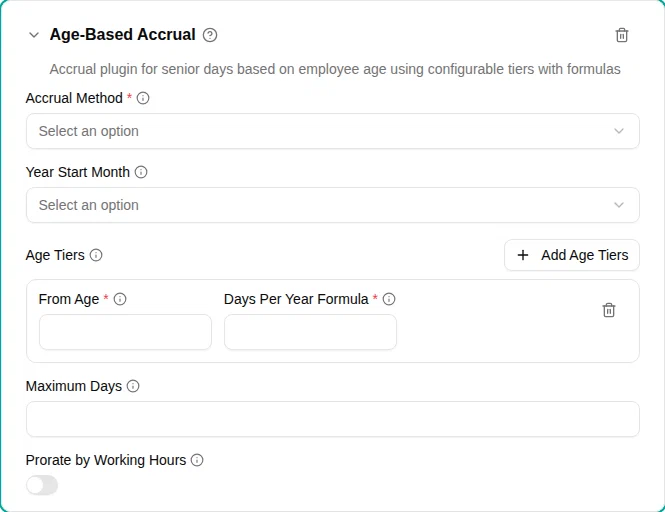
The Age-based accrual plugin grants additional time off based on employee age. This is commonly used for “senior days” where older employees receive extra vacation days, often mandated by collective agreements or company policy.
When to use
Use this plugin when:
- Older employees receive additional vacation days
- Your collective agreement grants extra days based on age
- You need flexible age-based calculations using formulas
- Different age brackets have different entitlements
Parameters
| Parameter | Description | Required |
|---|---|---|
| Age Tiers | One or more tiers, sorted by age. Each tier has a From Age and a Days Per Year Formula. | Yes |
| From Age | (per tier) Minimum age for the tier. Employees turning this age during the year qualify. | Yes |
| Days Per Year Formula | (per tier) Expression to calculate days per year. Can use the age variable. See Formula examples. | Yes |
| Maximum days | Maximum days per year cap. Set to 0 for no limit. | No |
| Accrual method | When accruals occur: yearly at start of year, yearly on birthday, monthly, every 2 months, or every 3 months. | Yes |
| Year start month | Which month starts the accrual year. Not used with Yearly on birthday. | Yes |
| Prorate by working hours | When turned on, part-time employees receive proportionally fewer days based on their FTE. | No |
An employee gets the highest tier whose From Age they have reached. There is no upper age limit: to stop the accrual from a certain age, add a tier from that age with the formula 0.
Accrual methods
Yearly at start of year
Grants the full amount on the first day of the vacation year. The employee’s age at that date determines eligibility and the formula result.
Best for: Simple annual grants tied to the vacation year.
Yearly on birthday
Grants the full amount on the employee’s birthday. The accrual uses their new age for the formula calculation.
Best for: Benefits that activate when the employee reaches a specific age.
Monthly
Distributes the annual amount across 12 monthly accruals. Eligibility is checked each month.
Best for: Gradual accrual throughout the year, similar to regular vacation.
Every 2 months
Distributes the annual amount across 6 bimonthly accruals (January, March, May, July, September, November based on year start). Eligibility is checked at each period.
Best for: Less frequent accrual while still spreading benefits throughout the year.
Every 3 months (quarterly)
Distributes the annual amount across 4 quarterly accruals. Eligibility is checked at each quarter.
Best for: Quarterly grants that align with business quarters or review cycles.
Formula examples
The formula field accepts mathematical expressions using the age variable.
Fixed amount
For a simple fixed number of days regardless of age:
5All eligible employees receive 5 days.
Linear increase
For one additional day per year of age above a threshold:
age - 60| Age | Days |
|---|---|
| 60 | 0 (not eligible if From Age > 60) |
| 61 | 1 |
| 62 | 2 |
| 65 | 5 |
Progressive formula
For more complex calculations:
(age - 60) / 2| Age | Days |
|---|---|
| 62 | 1 |
| 64 | 2 |
| 66 | 3 |
With maximum cap
Combine a formula with the Maximum Days parameter:
- Formula:
age - 60 - Maximum Days:
5
This limits the benefit to 5 days maximum, even for employees 66+.
How it works
The plugin evaluates eligibility and calculates accruals based on employee age:
- Age determination: Age is calculated at the accrual date
- Tier selection: The highest tier whose From Age the employee has reached applies. Below the first tier, nothing is accrued
- Formula evaluation: That tier’s formula is evaluated with the employee’s age
- Capping: Result is limited by Maximum Days if set
- Proration: FTE proration is applied if turned on
- Crediting: Amount is added to the time account
Age eligibility
An employee is eligible if they turn the minimum age at any point during the accrual year:
- From age: 62
- Year start: September
- Employee born October 15, 1963
- In September 2025, they are 61 but turn 62 in October
- They are eligible for the September 2025 - August 2026 accrual year
Examples
Danish senior days (Seniordag)
Many Danish collective agreements grant 1 extra day per year from age 60:
- Add the Age-Based Accrual plugin
- Add a tier with From Age
60and Days Per Year Formulaage - 59 - Set Maximum Days
to
5(common cap) - Set Accrual Method to Yearly at Start of Year
- Set Year Start Month to September
Result:
- Age 60: 1 day
- Age 61: 2 days
- Age 62: 3 days
- Age 63: 4 days
- Age 64+: 5 days (capped)
Fixed senior days
For a simple “5 extra days for everyone 60+” policy:
- Add the Age-Based Accrual plugin
- Add a tier with From Age
60and Days Per Year Formula5 - Set Accrual Method to Yearly at Start of Year
Tiered age brackets
For different entitlements at different ages, add one tier per bracket to the same plugin:
| From Age | Days Per Year Formula | Applies to |
|---|---|---|
55 | 2 | Ages 55–59 |
60 | 4 | Ages 60–64 |
65 | 6 | Ages 65+ |
Each employee gets the tier for the highest From Age they have reached.
Birthday-triggered benefit
For benefits that start on the employee’s actual birthday:
- Set Accrual Method to Yearly on Birthday
- Configure other parameters as needed
The accrual appears on the employee’s birthday each year.
Monthly senior accrual
For gradual monthly accrual of senior days:
- Set Accrual Method to Monthly
- Set the tier’s Days Per Year Formula
to
5 - Configure the tier’s From Age
The 5 days are distributed as ~0.42 days per month.
Quarterly senior accrual
For quarterly accrual of senior days:
- Set Accrual Method to Every 3 Months (Quarterly)
- Set the tier’s Days Per Year Formula
to
4 - Configure the tier’s From Age
The 4 days are distributed as 1 day per quarter.
Milestone age
Milestone age awards a single, one-time credit when an employee reaches a specific age — an extra day at 50, say, and two more at 60. Unlike the age tiers above, which grant days every year, each milestone is granted once.
Configuration
- Add the Milestone Age-Based Accrual plugin to a time off policy
- Under Age Milestones , add the milestones from youngest to oldest: each has an At Age and the Days awarded
- Choose the Accrual Method : On Birthday grants the days on the birthday itself; At Start of Vacation Year grants them on the first day of the vacation year the birthday falls in, set by the Vacation Year Start Month
- Click Save
Example
| Milestone | Days awarded |
|---|---|
| 50 years | 1 |
| 60 years | 2 |
An employee born on 10 March 1976 receives 1 day on 10 March 2026. With At Start of Vacation Year and a September start, the same day is granted on 1 September 2025 instead — the start of the vacation year that contains the birthday.
- The employee needs a birth date on their profile; without one, no milestone is granted.
- A milestone is granted only if the employee is employed on its grant date. Someone who joins at 52 never receives the 50-year milestone.
Troubleshooting
| Issue | Solution |
|---|---|
| Employee didn’t receive senior days | Verify their birth date and check if they reach the first tier’s “From Age” during the accrual year |
| Formula error | Check formula syntax. Use only age, numbers, and basic math operators (+, -, *, /) |
| Wrong amount calculated | Verify the formula of the tier that applies and check the “Maximum days” cap |
| Need different amounts per age bracket | Add one tier per bracket, each with its own “From Age” |
| Accrual stops too late or never stops | There is no upper age limit. Add a tier from the stop age with the formula 0 |
| Accrual on wrong date | Check “Accrual method” and “Year start month” settings |