Danish Inconvenience Hours (17-06 rule)
The Danish Inconvenience Hours filter implements the ulempetillæg / “17-06 rule” from the Danish public-sector working-time agreement (Aftale om arbejdstid mv. for tjenestemænd, § 13). It bundles all the weekday-evening, weekend and holiday clauses into a single configurable filter so you don’t have to chain multiple plugins to express the standard rule.

When to use
Use this filter as the basis of a policy that pays a Danish public-sector inconvenience supplement. It already covers:
- Weekday evenings/nights (default 17:00–06:00, configurable)
- Full weekends (Saturday 00:00 to Sunday 24:00)
- Standard Danish public holidays (søgnehelligdage)
- Partial coverage on Grundlovsdag (Constitution Day) from a configurable hour
- Partial coverage on Christmas Eve from a configurable hour
- Optionally, Store Bededag
The result is what an inconvenience-supplement payroll line typically needs. If your agreement only differs by a different start hour, use this filter and adjust the parameters — don’t reach for Time Interval and Danish Holidays separately.
Parameters
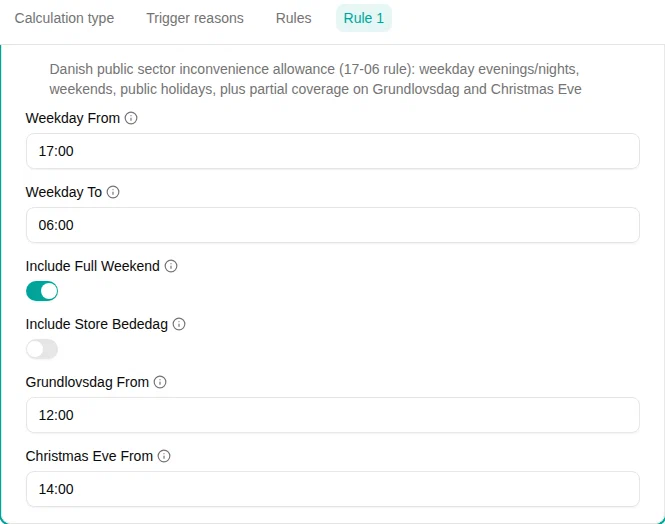
| Parameter | Description | Default |
|---|---|---|
| Weekday From | Start of the weekday off-hours window as HH:MM. | 17:00 |
| Weekday To | End of the weekday off-hours window as HH:MM. Use 24:00 for end of day. If To is earlier than From, the window crosses midnight (the normal case for an evening/night window). | 06:00 |
| Include Full Weekend | When on, the entire weekend (Saturday 00:00 to Sunday 24:00) counts. | On |
| Include Store Bededag | Treat Store Bededag (Great Prayer Day) as a full inconvenience day. Off by default because the holiday was abolished in 2024. | Off |
| Grundlovsdag From | Start time on 5 June (Constitution Day). The coverage runs from this time to 24:00. | 12:00 |
| Christmas Eve From | Start time on 24 December. The coverage runs from this time to 24:00. | 14:00 |
A zero-length weekday window (where From equals To) is rejected at save time — use 00:00..24:00 if you actually want full-day weekday coverage.
How it works
The filter computes, day by day, the union of every clause that applies to that day, then intersects the result with the input ranges.
- On a regular weekday, coverage is the weekday window only. With the default 17:00–06:00 window, that gives both
00:00–06:00in the morning and17:00–24:00in the evening. - On a weekend day, coverage is the entire day when Include Full Weekend is on (the weekday window is ignored on Saturday and Sunday).
- On a standard Danish holiday, coverage is the entire day, regardless of which weekday it falls on.
- On Grundlovsdag (5 June), coverage is the weekday window unioned with
[Grundlovsdag From, 24:00]. With the defaults that means00:00–06:00∪12:00–24:00. - On Christmas Eve (24 December), the same pattern with
[Christmas Eve From, 24:00].
When a holiday lands on a Saturday or Sunday, the holiday rule wins (full day). When a Christmas Eve or Grundlovsdag lands on a weekend, the broader weekend rule also covers the whole day.
Examples
Standard 17-06 inconvenience supplement
Leave every parameter on its default and add a rule using this filter to a policy. A Tuesday 16:00–20:00 shift contributes 17:00–20:00; a Saturday 09:00–17:00 shift contributes the whole 09:00–17:00.
Tighter window 18-05
Set Weekday From
to 18:00 and Weekday To
to 05:00. Holiday and weekend rules are unaffected.
Without weekend coverage (paid by a separate policy)
Turn off Include Full Weekend so the weekend supplement can be paid by a separate Danish Weekend Supplement policy without double-counting hours inside the same policy.