Flat Per Session
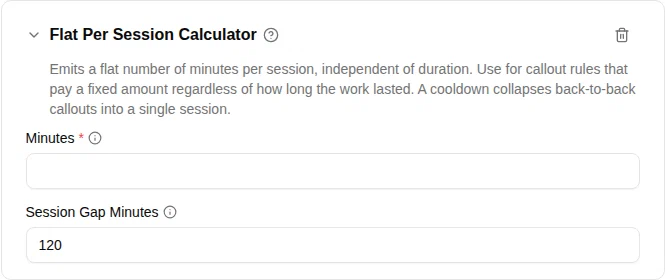
The Flat Per Session calculator emits a fixed amount per session, independent of how long the session actually lasted. It is built for callout-style agreements that pay the same amount whether the work took fifteen minutes or three hours.

When to use
Use this calculator when the agreement says something like:
- “Every presence callout is paid 4 hours, regardless of how long the task takes.”
- “Each visit pays a flat 2-hour minimum.”
- “Add 1 extra hour whenever a callout falls in the night window.”
A 30-minute callout and a 5-hour callout both pay the same flat amount. A configurable cooldown prevents back-to-back registrations from being counted as several separate sessions — a useful safeguard when an employee checks out and back in during the same intervention.
If the agreement scales with duration ("+1 hour per started hour"), use Started Hour instead.
Parameters
| Parameter | Description | Required |
|---|---|---|
| Minutes | Flat amount emitted per session, in minutes. Set to 240 for 4 hours, 300 for 5 hours, 434 for 7 hours 14 minutes (≈ 7.24 hours decimal). | Yes |
| Session Gap Minutes | Cooldown window in minutes. Ranges separated by less than this gap are merged into a single session and pay once. Default 120 (two hours). | No (default 120) |
How it works
The calculator processes the ranges that survived the rule’s filters in two steps:
- Merge close-together ranges into sessions. Two ranges separated by less than Session Gap Minutes are treated as one session. A larger gap opens a new session.
- Pay each session the flat amount. The total is
number of sessions × Minutes.
Examples
With Minutes set to 240 (4 hours) and Session Gap Minutes at the default 120:
| Callouts | Sessions | Total |
|---|---|---|
| 18:00 – 20:15 | 1 | 4 hours |
| 18:00 – 23:00 | 1 | 4 hours |
| 18:00 – 19:00, then 19:30 – 20:00 (gap 30 min) | merged into 1 | 4 hours |
| 14:00 – 14:30, then 18:00 – 18:30 (gap 3 h 30) | 2 | 8 hours |
Example: on-site callout with day-of-week rates
A typical on-site-callout agreement pays a different flat amount depending on the day:
| Day | Flat amount |
|---|---|
| Weekday (Mon – Fri) | 4 hours |
| Saturday | 5 hours |
| Sunday or public holiday | 7 hours 14 minutes (7.24 h) |
In each case, the duration of the actual task does not matter, and the agreement separately credits both a flex-hour and a time-off-in-lieu account with the same amount.
This is configured as two parallel allowance policies — one whose target activity feeds the flex account, one whose target activity feeds the time-off-in-lieu account — both scoped to the same trigger reason (e.g. On-site callout). Both policies have identical rule sets; only the target activity differs.
One policy, three rules
In each policy, scope it to the On-site callout reason and add three rules in this order — the first matching rule consumes the session, so the most specific rule must come first.
Rule 1 — Sunday & public holidays (most specific)
- Filter 1: Day of Week — Sunday only, or
- Filter 1 (alternative): Danish Holidays — all holidays
- Calculator: Flat Per Session — Minutes
434(= 7 h 14 min ≈ 7.24 h)
Because rules are stacked, you usually need this rule twice in the policy — once for “Sunday” and once for “Danish Holidays”. Order does not matter between these two as long as they both come before the Saturday and weekday rules.
Rule 2 — Saturday
- Filter: Day of Week — Saturday only
- Calculator: Flat Per Session — Minutes
300(= 5 h)
Rule 3 — Weekdays (catch-all)
- Filter: none (or Weekday Filter to be explicit)
- Calculator: Flat Per Session — Minutes
240(= 4 h)
Verifying the numbers
| Callout | Day | Matched rule | Total |
|---|---|---|---|
| 18:00 – 20:15 | Wednesday | Rule 3 | 4 hours |
| 18:00 – 23:00 | Wednesday | Rule 3 | 4 hours |
| 18:00 – 20:15 | Saturday | Rule 2 | 5 hours |
| 18:00 – 23:00 | Saturday | Rule 2 | 5 hours |
| 18:00 – 20:15 | Sunday | Rule 1 | 7 h 14 min |
| 18:00 – 23:00 | a public holiday | Rule 1 | 7 h 14 min |
Duplicate the whole policy with the time-off-in-lieu target activity to credit that account in parallel — both policies receive the same input, so the same callout earns both payouts at once.