Work time compliance
Show that daily rest and the weekly free day were respected — and find the days they were not.

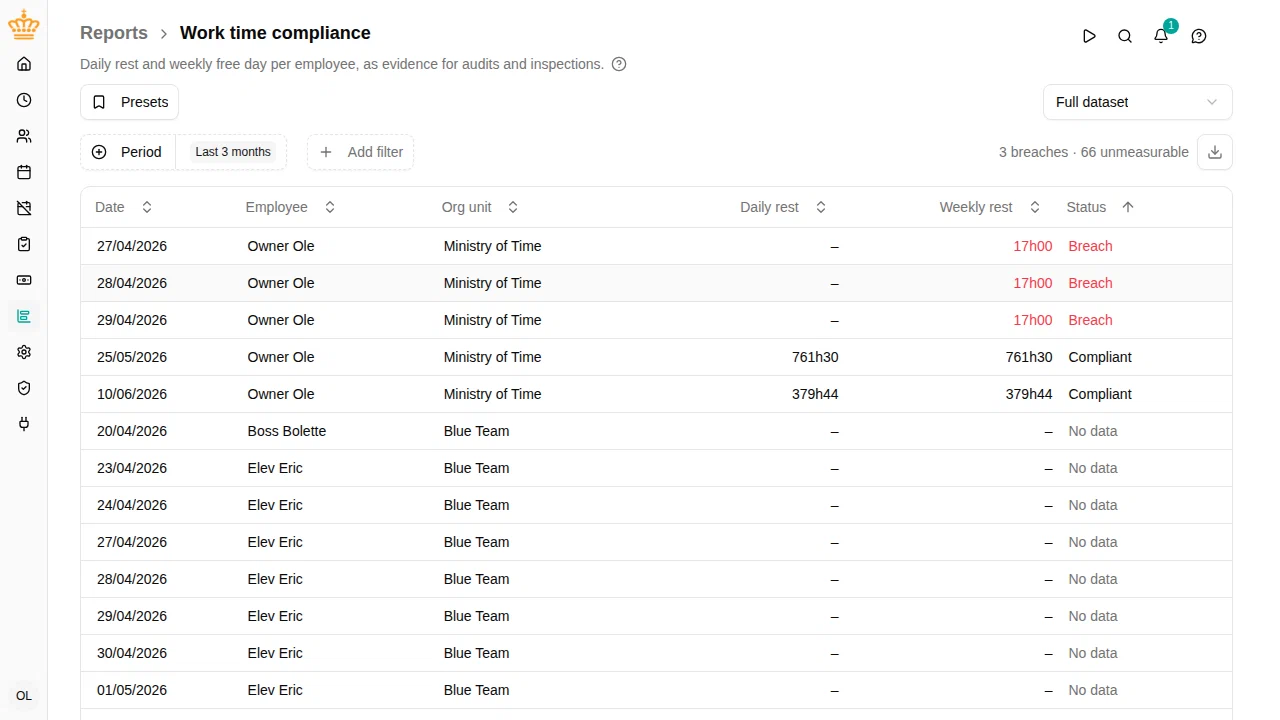
Overview
The EU Working Time Directive gives every employee a minimum daily rest between two working days, and one longer continuous rest each week. This report measures both from check in/out registrations, so you can follow up on breaches — and hand an inspector a document that shows the rest of the time was fine.
Each row is one employee on one day they worked:
- Daily rest — the unbroken rest before that day’s first check-in
- Weekly rest — the longest unbroken rest in the days leading up to it
- Status — whether the day met both requirements
Navigate to in the sidebar.
The two extracts
The dropdown above the table chooses what the report lists:
- Breaches only — just the days that fell short, for follow-up
- Full dataset — every day worked, met or not, so the report itself shows that the rules were kept
The summary beside it always counts the whole period, not only the rows on screen. In Breaches only you still see how many days could not be measured.
When a day cannot be measured
Rest is the time between checking out and checking in again, so it can only be measured for employees who use check in/out. A day someone worked without checking in shows a dash and the status No data .
This is deliberate: a day with no registrations is not evidence that the rules were kept. If you are using this report as documentation, No data rows are the gaps to close.
A rest period is also left unmeasured when it began before the earliest registration on record — its true length is unknown, so the report does not judge it.
Rest requirements and agreements
The report measures every employee, and compares each against the requirements that apply to them. Those come from the work time policy that applies to them, where an administrator sets the required daily rest and weekly rest.
If your organisation has an agreement allowing shorter rest for a group — for example one made with a works council — the administrator lowers the requirement on that group’s policy. The report then shows their real rest figures measured against the agreed requirement, so the group still appears in the documentation rather than dropping out of it.
Requirements default to the directive’s own figures: 11 hours of daily rest, and 35 hours of weekly rest within any 7 days.
Where else breaches appear
Once the rules are turned on in a work time policy, breaches also appear as warnings on the employee’s timesheet, on the day they happened. Nobody is prevented from checking in — a breach is recorded and reported, never blocked.
Filtering
The report uses the common filters: period, org unit, manager, and employment terms.
Exporting
Click the download button at the right of the filter bar (Export to Excel
) to download the current view as an .xlsx file — the form to keep on file as documentation.