Registered hours
See how much time your employees registered on activities over a period, grouped the way you need.

If you can’t see sensitive absence information for an employee, their sick leave is left out of this report, totals included.
Overview
The Registered hours report sums up timesheet registrations over a period. Use it to answer questions like:
- How many hours did each employee register last month?
- How much time went into a specific activity or project?
- How many vacation days were taken per department?
Navigate to in the sidebar.
Filtering
Besides the common filters (period, org unit, manager, employment terms), you can narrow down by:
- Activity — one or more specific activities
- Activity type — Work , Time Off , Non-Work , or Allowance
- Approval — pick Approved to count only time in fully approved periods
Allowances are left out until you tick Allowance . An allowance — overtime, for example — is a supplement on hours that are already registered as work, so counting it alongside them would overstate the time worked. Tick it when you need to see those entries; they stay on their own rows, with their own total.
The Approval filter is the one to use when the figures have to be final — for payroll or invoicing. A period counts only once its timesheet has been fully approved: if it is still waiting for one of several approvers, it is left out. So are days no approved timesheet covers at all.
Grouping the results
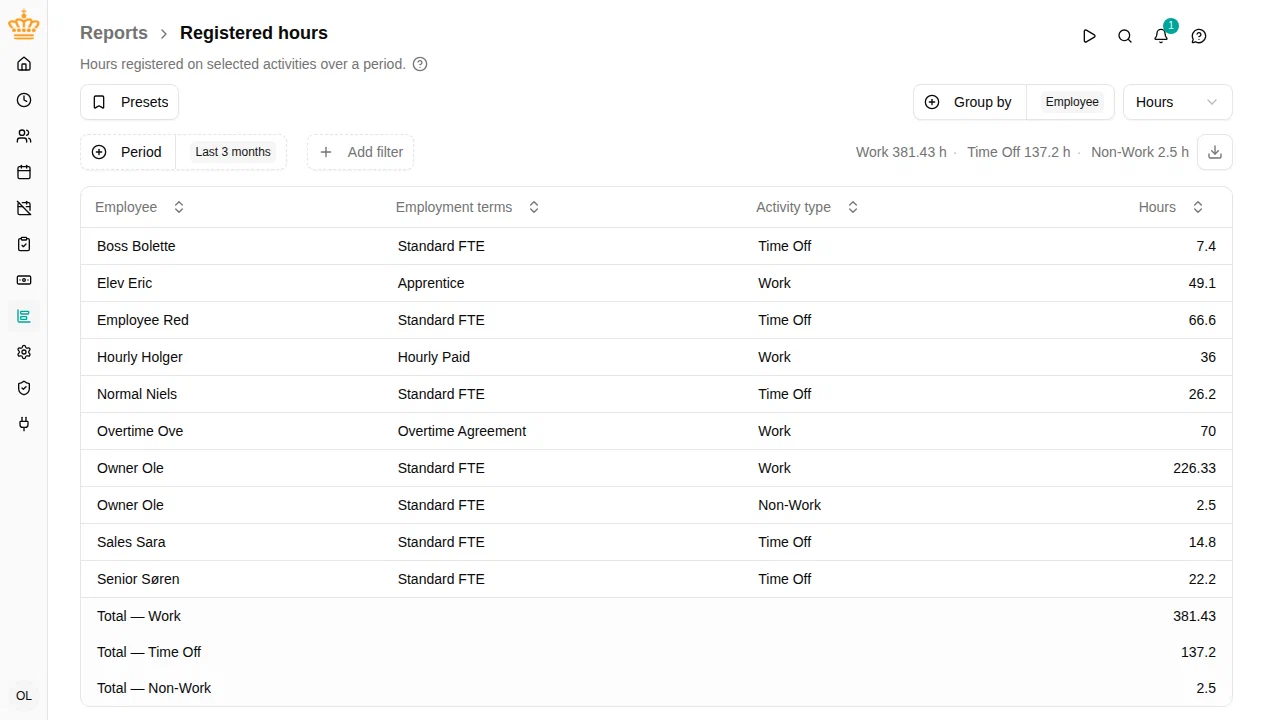
The Group by control decides what each row represents. Pick any combination of:
- Org unit
- Employee (also adds an employment terms column)
- Country (shown only if your workspace uses work countries)
- Activity
- Project (shown only if you can read projects)
- Dimension (shown only if you can read settings)
- Day
Each row is one combination of the selected groupings — for example, group by employee and activity to see each employee’s time per activity. Clear all groupings to get one row per activity type.
Every row is also split by activity type, whatever else you group by, and the Activity type column is always shown. Worked hours, time off and allowances therefore never share a row, and the table gives one total per activity type rather than a single combined figure.
Hours or days
Use the unit selector to switch the value column between Hours and Days . The per-type totals follow the selected unit.
Exporting
Click the download button at the right of the filter bar (Export to Excel
) to download the current view as an .xlsx file. The export uses the same filters, groupings, and unit as the table on screen.