Hours & minutes vs decimal hours
mTime shows working time as hours and minutes — 7h30, 7:30 — rather than
as decimal hours — 7,5, 7.5. This is the format we recommend, and it is
the default for every new user. If you are coming from a system that used
decimal hours, this page explains why we made that choice and how you can still
switch the display for yourself.
0,4 hours actually means.Why we recommend hours & minutes
People think in minutes, not in tenths of an hour
Ask someone how long their meeting was and they’ll say “an hour and a half” or
“forty minutes” — never “1,5 hours” or “0,67 hours”. Everyone knows how long
20 minutes feels. Almost nobody can picture 0,33 hours.
That gap matters when people register their own time. If the timesheet asks for
decimal hours and someone types 1,6 because it looks about right, the value is
a guess — they meant “about an hour and a half”, which is really 1h30
(1,5), not 1,6 (1h36). Registering in hours and minutes removes the
guesswork: you enter the time you actually mean.
Minutes always add up — decimal hours don’t
Three tasks of 20 minutes each is exactly one hour. But written as decimal
hours, 20 minutes rounds to 0,33, and:
0,33 + 0,33 + 0,33 = 0,99— not1,00
The minute is exact; the decimal is a rounded approximation. Do this across a week or a whole team and the small errors pile up into totals that don’t match. mTime avoids this entirely by keeping minutes as its internal unit for every calculation — worked time, expected time, flex balances, and reports are all computed in whole minutes and only converted to a display format at the very end. Twenty plus twenty plus twenty is always sixty.
Clock times are already measured in minutes
When you check in and out, mTime records the time to the minute — not to the second. We deliberately don’t track seconds: nobody registers “3 minutes and 40 seconds” of work, and pretending to that precision would be false. Since the raw data is in minutes, keeping minutes as the unit all the way through means no rounding step ever has to happen. Decimal hours would force a conversion — and a conversion is exactly where rounding errors creep in.
It’s a personal display preference
The format is only about how time is shown to you. It changes nothing about
the data underneath — everyone in your workspace is working with the same exact
minute values, whether they see 7h30 or 7,5. Switching format is safe and
reversible, and it affects only your own screen.
To change it:
- Click your profile picture or name in the bottom-left corner
- Select Preferences
- In the Formatting section, choose a Timesheet Hour Format

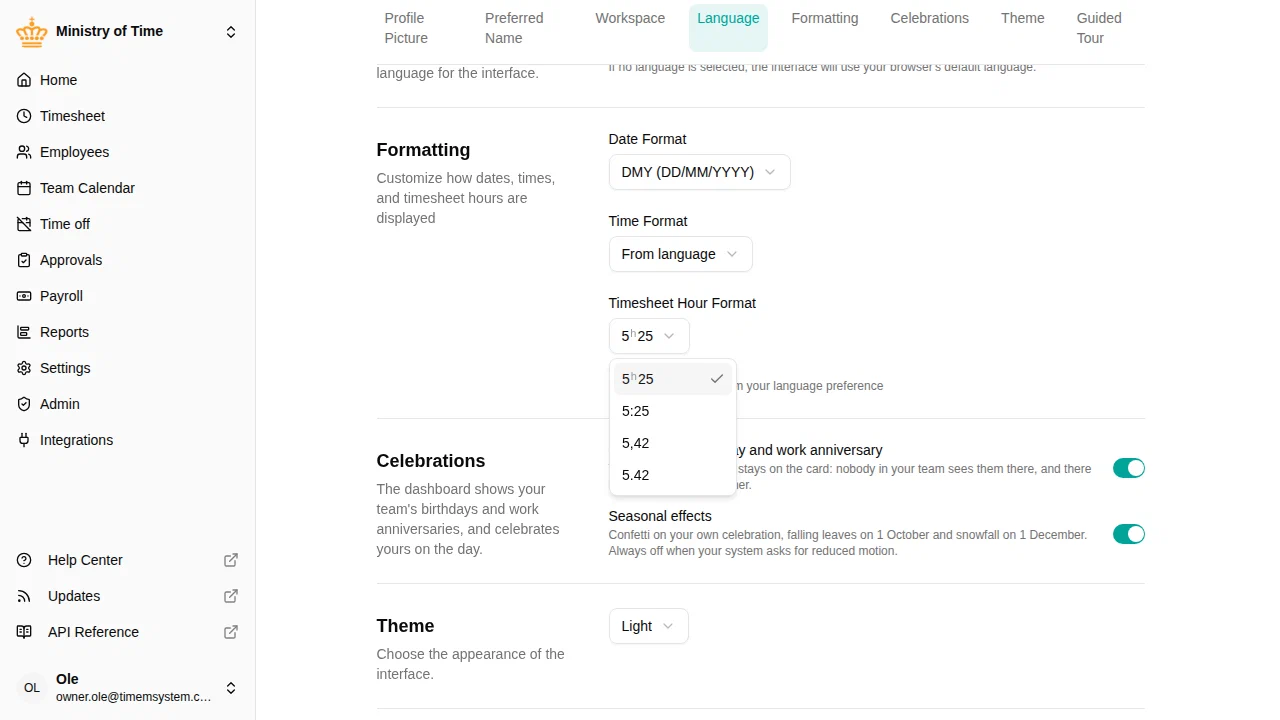
The dropdown previews the same duration in each style. Notice that 5h25
becomes 5,42 in decimal — a good illustration of why decimal is hard to read
at a glance. You can pick from four styles — two show hours and minutes, two
show decimal hours:
| Format | Example (7h30) | Type |
|---|---|---|
7h30 | hours + h + minutes | Hours & minutes (recommended) |
7:30 | hours : minutes | Hours & minutes |
7,5 | decimal with a comma | Decimal hours |
7.5 | decimal with a dot | Decimal hours |
We keep the decimal options for people who genuinely prefer them or who came from mTime 5 and are used to reading time that way. But if you’re setting up a workspace for the first time, we suggest leaving everyone on hours and minutes.
A note for administrators: work time norms
When you define an employee’s expected working time — the work time
norm and its
distribution across the days of the week — mTime always stores it in exact
minutes. You can type a value in decimal hours if that’s what you have on
paper (for example 37,5 becomes 37:30), and mTime converts it to minutes for
you. But the stored day is the minutes, not the decimal.
This is where decimal hours cause the most confusion. A contract that says
“7,11 hours per day” looks precise, but 7,11 hours is 7h 6min 36sec — and
mTime doesn’t track seconds. There is no sensible way to work a day of 7,11
hours if the smallest unit you register is the minute. Defining the day as
7h06 or 7h07 is honest about what people will actually do.
Because of this, the norm editor always shows values in exact hours and minutes. The day-by-day split shows only hours and minutes; if you prefer decimal hours, the weekly value also shows the decimal figure, greyed, next to the exact hours and minutes.
7h30, 7h24), not in
decimal hours. If a decimal doesn’t land on a clean minute, mTime rounds it to
the nearest minute — the number can’t be worked exactly as written.In short
- Give people a unit they understand. Nobody has to work out what
0,4hours means — they work24 minutes. - Totals always reconcile, because every calculation happens in whole minutes.
- The display is yours to choose, but hours and minutes is the accurate, recommended default.